Reports and royalties
发布于 更新于
Several screens in the console turn what happens on the site into numbers. Dashboard shows where the catalog's publishing stands. Under Analytics, Revenue shows what sold, Audience how readers followed, read, and reacted to each series, Episodes how far members read each episode and the page at which readers leave it, and Cohorts how the readers who signed up each week kept coming back and how many of them bought. Royalties under Reports works out what the tenant owes each Author for a month of sales, then closes that month into a statement that never changes.
Every member of the staff sees Dashboard, Audience, Episodes, and Cohorts. Only a Tenant admin sees Revenue, Royalties, and the Funnel on Cohorts, downloads a report or a statement as CSV, closes a month, or changes how months are closed; for anyone else those screens and controls are not there.
Which day a sale or a read falls on
Every date these screens count by is a calendar day in the tenant's time zone, set under Settings › General › Time zone. A tenant that has never set one uses the install's default, which the operator chooses. A day runs from midnight to midnight in that zone, and a month from 00:00 on its first day to 00:00 on the first day of the next. A sale made at 08:30 on 1 April in Tokyo belongs to April for a tenant on Asia/Tokyo, and to March for a tenant on UTC, where it is still 23:30 on 31 March.
- A sale falls on the moment the purchase was recorded, which for a payment that settles later, such as konbini, is when the payment arrived.
- A read falls on the day the member opened or finished the episode.
- A follow falls on the moment it was made, and its end on the moment the reader took it back or deleted their account.
- A statement keeps the zone its month was cut in, and shows it under the month as Cut in the tenant's time zone at close.
Changing the time zone after a statement has been closed leaves that statement as it was closed. The month after it starts where the statement ended, at midnight in the old zone, and ends at midnight in the new one, so a sale made in the hours between the two midnights is counted once, in whichever month the old zone put it in. Every month after that runs from midnight to midnight in the new zone. Days the daily statistics have already counted, which Audience and Episodes read, are not recounted; the change applies from the next day they count. Revenue and the followers on Audience are read from the sales and the follows themselves, so they follow the new zone at once.
Dashboard
Dashboard, the first entry of the console, is an overview of the catalog's publishing, not of sales or reading. Its three figures count the whole tenant, with no date range:
| Figure | What it counts |
|---|---|
| Published series | Series that are published |
| Draft episodes | Episodes saved as a draft |
| Scheduled releases | Episodes with a release date that has not come yet |
Publishing queue lists up to ten of those episodes: the scheduled ones first, soonest release first, then the drafts, newest first. Scheduled for is shown in the tenant's time zone, and Not set on a draft with no date.
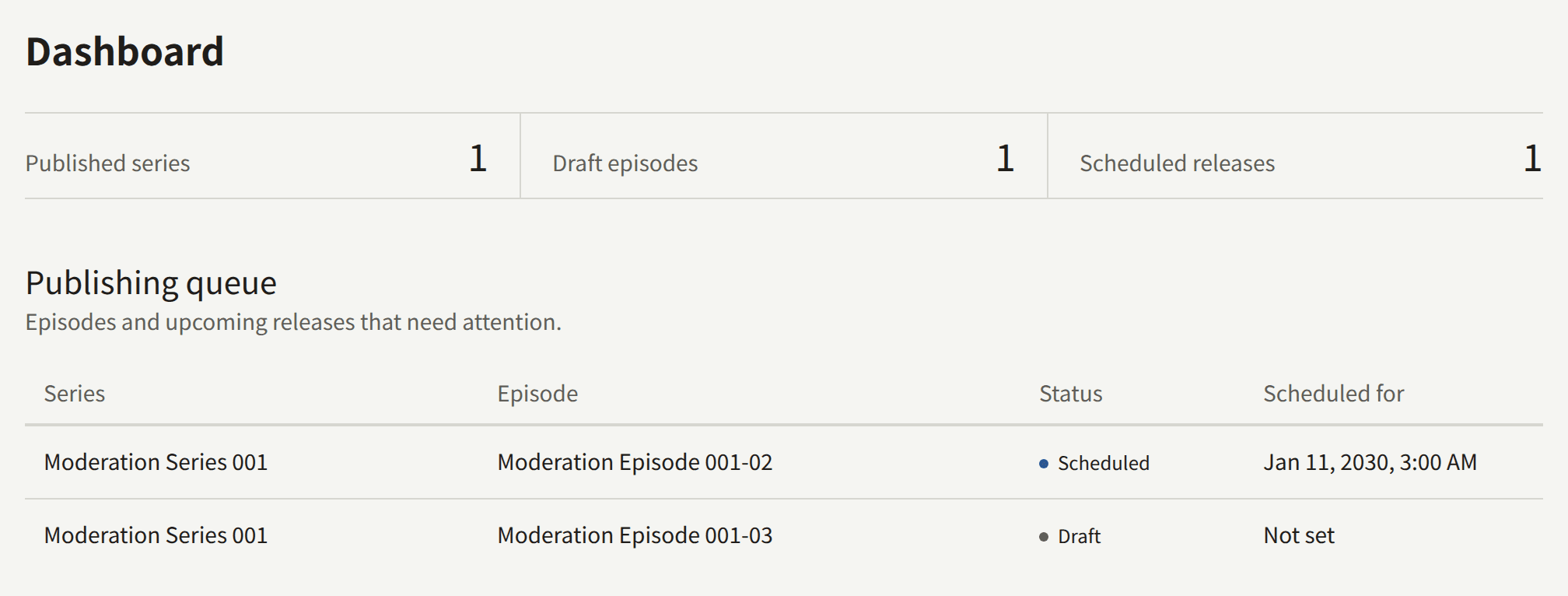
The screen updates as soon as a member of the staff saves a series or an episode, and when a scheduled episode goes live on its own, which then leaves the queue.
Analytics
Revenue, Audience, Cohorts, and the drop-off of an episode each report a period of the tenant's days. Choose it with From and To and Apply; it covers at most 366 days. Without a choice a screen covers the 28 days up to and including yesterday, and the line under the dates names the period and the zone. Reset goes back to those 28 days.
A screen opens with the totals of its period and a chart of them by day, and below them a table. By day, By series, and By episode choose what the table's rows are, and choosing a column's heading sorts the table by it; choosing it again sorts it the other way. The period, the rows, and the sort are all in the page's address, so a bookmark or a link reopens the same report.
Figures that come from the daily statistics reach a day once that day is over. publira worker counts each day after midnight in the tenant's time zone, on its next hourly pass, so a read made today appears tomorrow. While the worker is stopped no new day is counted, and when it starts again it catches up on the days it missed. Overview describes keeping publira worker running.
Revenue
Revenue shows what sold over the period, in the tenant's currency.
| Figure | What it counts |
|---|---|
| Purchases | Purchases made in the period, refunded ones included |
| Gross sales | What those purchases were paid |
| Refunded | What went back to the readers of them: refunds, and disputes the tenant lost |
| Net sales | Gross sales less Refunded: what the tenant kept |
The chart is the net sales of each day. A sale counts on the day it was made, and what went back on it is taken off that same day, however much later it went back, so a day already reported can fall afterwards, and a day on which more went back than sold is drawn below the line. A dispute still open takes nothing back until it is lost. A purchase of a volume or of the rest of a series is a sale of each episode it opened, at the part of the price the episode accounts for, the part a royalty statement credits, and a sale of their series at all of it. A purchase paid in a currency other than the tenant's current one is in no figure. An episode paid with the tenant's coins is a sale at what its coins were paid for, the amount a royalty statement credits, and a purchase of a pack of coins is in no figure: its money is counted as its coins are spent, and a refund of the pack in full or a dispute of it is taken off the sales its spent coins made. Revenue reads the purchases themselves, so a sale made a moment ago is already in it.
Audience
Audience shows how readers followed, read, and reacted to the tenant's series over the period.
| Figure | What it counts |
|---|---|
| Followers | Readers following at the end of the period. A follow is counted as soon as it is made, and ends when the reader takes it back or deletes their account |
| Views | Views of a series' page and of its episodes, by every reader, signed in or not |
| Completions | Members finishing one of its episodes for the first time |
| Reactions | Presses of an episode's reaction control that added to the reader's score of it |
The chart is the followers at the end of each day. By series lists every series, with the follows made and ended in the period, and its Rating and Raters: the rating the series stands at now, the one its page shows, over every reaction it has ever collected rather than the period's. A series no reader has rated shows —.
Episodes
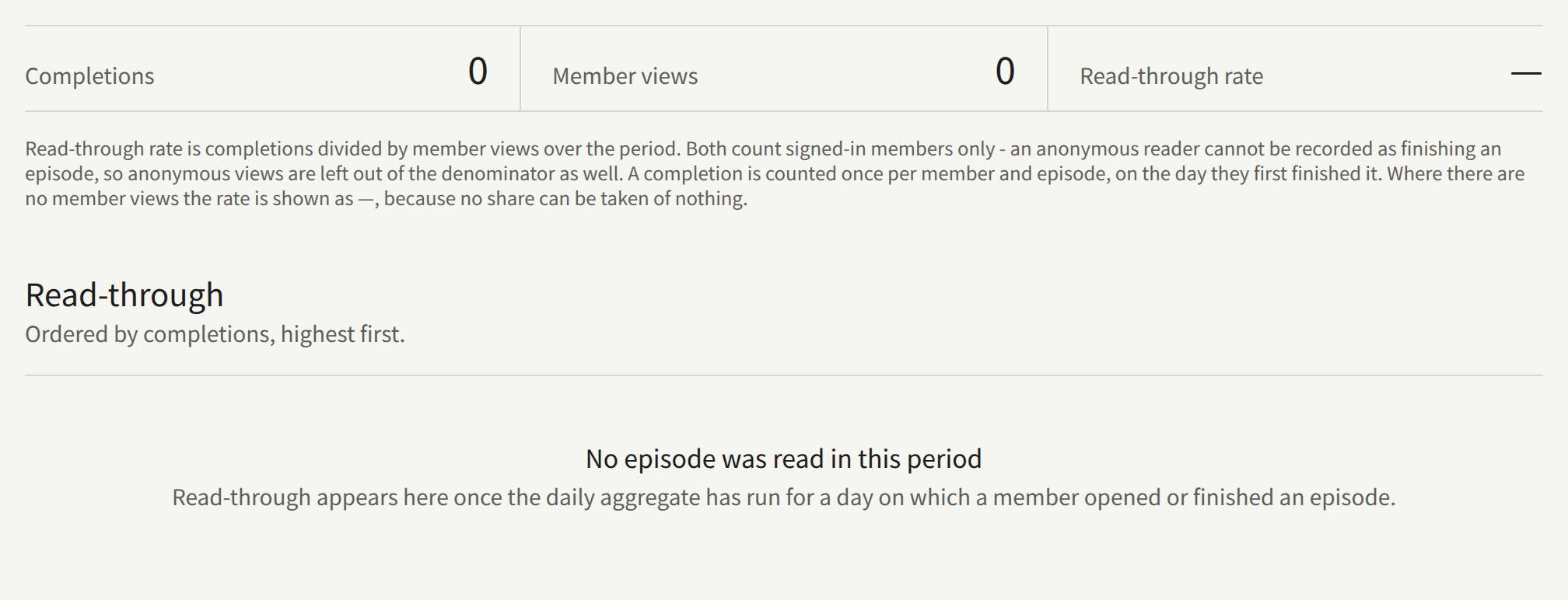
Episodes shows how many members finish each episode they open. Its figures cover the last 28 days in the tenant's time zone, up to and including yesterday, whatever period the other screens show; the line under the title states the dates and the zone.
| Figure | What it counts |
|---|---|
| Completions | Members finishing an episode. Each member counts once for each episode, on the day they first finished it, however often they read it again |
| Member views | Times signed-in members opened an episode. A member's opens of one episode count once in each half hour of the clock, from :00 to :29 and from :30 to :59, so opening it again in the same half hour adds nothing, while opening it at 10:29 and again at 10:30 counts twice |
| Read-through rate | Completions divided by Member views, shown as — when there are no views |
Only signed-in members count. A reader who is not signed in cannot be recorded as finishing an episode, so their views are left out as well. How a member came to read the episode makes no difference: an episode bought, opened with a ticket, or free counts the same, and a purchase alone counts nothing.
Read-through lists each episode read in the period, the most completions first, twenty to a page. The totals at the top cover the whole period, whichever page is shown.
Drop-off
Choosing an episode in Read-through opens its Drop-off: how far into the episode its readers got over a period, page by page.
| Figure | What it counts |
|---|---|
| Readers | Readers who reached the first page |
| Reached the last page | Readers who reached the episode's last page |
| Pages | The pages the episode has now |
The chart steps down from the first page to the last, and the table gives each page the readers who reached it, their share of those who reached the first, and the readers who left at it: those who reached it but not the next. Sorting by Left here brings the page most readers leave at to the top. A reader is counted at the page where their place in the episode stood at the end of a day, so a reader who read on several days of the period is counted once on each. A page past the episode's last, marked (removed), was reached before pages were taken out of the episode.
Cohorts and funnel
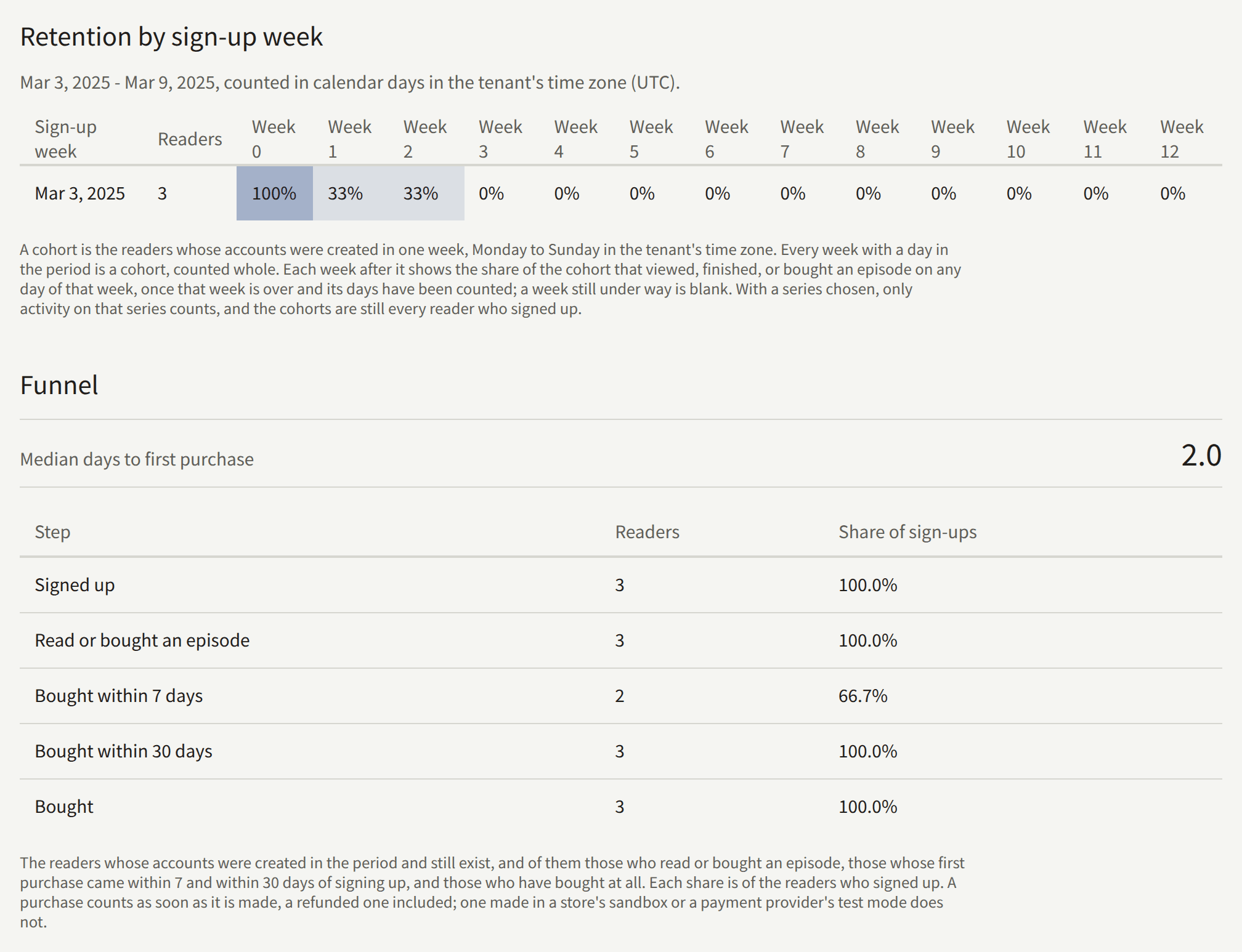
Cohorts follows the readers who signed up in each week of the period. A reader here is an account of the tenant's site; the staff's own accounts are left out.
Retention by sign-up week has a row for every week with a day in the period, Monday to Sunday in the tenant's time zone, so its first row can begin before From and its last end after To. Each row gives the week, the readers whose accounts were created in it, and, under Week 0 to Week 12, the share of them who viewed, finished, or bought an episode on any day of the sign-up week and of each of the twelve weeks after it. A reader is counted once in a week however many days they came back. The deeper a cell's shade, the larger the share. A week reaches the table once it is over and its days have been counted, so a week still under way is blank; a row for a week nobody signed up in shows —.
Choose a series under Series to count only the reading and buying of that series. The rows are still every reader who signed up, so the shares show how many of the week's new readers went on to that series.
Funnel, shown to a Tenant admin, counts the readers who signed up in the period and how far they got:
| Step | What it counts |
|---|---|
| Signed up | Readers whose accounts were created in the period and still exist |
| Read or bought an episode | Of them, those who viewed, finished, or bought an episode on any day that has been counted |
| Bought within 7 days | Of them, those whose first purchase came less than 7 days after their account was created |
| Bought within 30 days | The same within 30 days |
| Bought | Of them, those who have bought at all |
Share of sign-ups is each count over Signed up. Median days to first purchase is the middle of the waits, in days, from an account being created to its first purchase, over the readers who bought; it is — until one has. A purchase counts as soon as it is made, a refunded one included, while one made in a store's sandbox or a payment provider's test mode does not.
A deleted account leaves its row and every count over it at once. The reading and buying these screens count is kept from the day the install began keeping it, which for an install upgraded to the release that added Cohorts is the oldest day whose analytics events were still kept at the upgrade: a week before that shows the readers who signed up in it but none of what they did, and is never filled in afterwards.
Downloading a report as CSV
Download CSV, beside the table of Revenue, Audience, and Drop-off, downloads that table's report over the period the screen shows: by day, by series, or by episode, as the table is. The file holds every row of the report, whatever the table's sort, in the order the report keeps: the days in order, the series or episodes of Revenue by net sales and the series of Audience by followers, highest first, and the pages of a drop-off in order. Read-through on Episodes and Cohorts have no download.
The file is named after the report, the tenant, and the period, such as revenue-by-series-<tenant>-2025-03-03--2025-03-09.csv, and for a drop-off drop-off-<tenant>-<episode>-<from>--<to>.csv. It is UTF-8, with a byte order mark so that Excel reads it correctly, one row for each row of the report under a header row, and no total row. Its columns are:
| Report | Columns |
|---|---|
| Revenue by day | date, purchase_count, gross_amount, refunded_amount, net_amount, currency |
| Revenue by series | start_date, end_date, series_id, series_title, purchase_count, gross_amount, refunded_amount, net_amount, currency |
| Revenue by episode | start_date, end_date, series_id, series_title, episode_id, episode_title, purchase_count, gross_amount, refunded_amount, net_amount, currency |
| Audience by day | date, follower_count, followed_count, unfollowed_count, view_count, complete_count, reaction_count, reaction_points |
| Audience by series | start_date, end_date, series_id, series_title, follower_count, followed_count, unfollowed_count, view_count, complete_count, reaction_count, reaction_points, rating_average, rating_count |
| Drop-off | start_date, end_date, episode_id, page_index, reader_count |
date, start_date, and end_date are the tenant's days, YYYY-MM-DD; the last two are the period of the download, the same on every row. Amounts are in the smallest unit of the currency, yen for JPY and cents for USD, and currency is the tenant's. rating_average has one decimal, and is 0.0 for a series no reader has rated. page_index counts from 0 for the first page, and reader_count is the readers who reached it. Titles are in the tenant's default language, and the IDs keep a row tied to its series or episode across renames. A cell that a spreadsheet would read as a formula is written so that it stays text.
A report is read when it is downloaded, so a period that includes today can download different figures later. Each download is recorded in Audit logs as Analytics CSV downloaded.
Royalties
Royalties works out, month by month, what each Author is owed on the sales of the episodes they are credited on. A month stays open, its figures following every sale, refund, and change of a share, until it is closed. Closing it writes a statement that never changes again. The statement is what the tenant pays its Authors from: Publira pays no one, and the statement is the record of what is owed.
What an Author is owed
An Author is paid a share of each episode they are credited on. The share is set on the credit, as a percentage of the episode's sales, and whatever the shares on an episode leave is the publisher's:
- On the series form, Authors sets each credit's share under Share of author. These credits are the template a new episode is created with; changing them leaves the existing episodes as they are.
- On an episode, Authors changes that episode's own credits and shares, and Save authors stores them.
- On the series' episode list, Credits › Set share changes one credit's share on many episodes at once.
A share is between 0 and 100 percent, with up to two decimal places, and the shares on an episode add up to no more than 100. A share of 0 credits an Author without paying them. An Editor can set shares too, since they edit the catalog.
For each credit, a month's payout is:
(the episode's sales in the month − the refunds on those sales) × the share, rounded down to the smallest unit of the tenant's currency, such as a yen or a cent
The sales of a month are:
- Purchases of the episode on the site, through Stripe or PAY.JP, at the price the reader paid.
- Purchases on the site of a volume holding the episode, each a sale of the episode at its part of the price the reader paid. That price is divided among the volume's episodes in proportion to their own prices when the purchase was recorded, or evenly when none of them has a price, so a free episode in a volume with priced ones takes no part and has no sale. The parts are fixed with the purchase: repricing an episode or changing what the volume holds afterwards does not move them. A partial refund of the volume is divided in the same proportion, each episode's part rounded down.
- Purchases on the site of the rest of a series, each a sale of every episode it opened at its part of the price the reader paid. Each episode's part is fixed when the reader starts the checkout: the bundle discount is spread over the episodes in proportion to the prices they sold at, a campaign price while one was open, so a later change to an episode's price or to the series' discount does not move it. When a promotion code makes the reader pay less than the checkout's price, the parts are reduced in the same proportion. A partial refund is divided in the same proportion as the price, each episode's part rounded down.
- Purchases in the tenant's app through the App Store or Google Play, at the episode's price. The store's commission is not taken off.
- Purchases of the episode with the tenant's coins, on the site or in the app, at what the coins spent were paid for. Each coin of a pack is worth an equal part of what the reader paid for the pack, its bonus coins included, so the bonus is a discount the tenant gives: a pack of 1,100 coins, 100 of them a bonus, bought for ¥1,000 makes each coin worth ¥0.909, and an episode of 100 coins a sale of ¥90, rounded down to the smallest unit of the currency. A coin granted without a payment is worth nothing, and so is one of a test purchase or of a pack paid in a currency other than the tenant's current one. What a sale is worth is fixed when the coins are spent: a pack edited afterwards does not move it.
Every amount is in the tenant's currency, and a closed statement keeps the currency it was closed in. A purchase paid in another currency, which happens only when a reader completes a payment started before the tenant changed its currency, opens the episode but is not a sale on the statement.
Nothing else is a sale. A purchase of a pack of coins is not one: its money is the sales its coins make as they are spent. Access tickets, Free if you wait, free reading periods, and an Author reading their own episode open an episode without one. A purchase from the App Store sandbox or a Play license tester, and one made with Stripe's or PAY.JP's test keys, is a test and is left out.
A purchase that is refunded in full drops out of the month it was bought in. A partial refund leaves the sale in, and its amount is taken off under Refunded. Either way, while the month of the purchase is open, the refund counts against that month, not the month of the refund.
A Stripe payment whose dispute the reader's bank decides against you counts as refunded in full from the moment Stripe reports the decision, here and after the close alike. A dispute that is still open, or that is decided for you, leaves the sale in.
A pack of coins refunded in full or disputed refunds, on each purchase its spent coins paid for, what those coins were worth. The reader keeps the episodes they opened, so each purchase stays a sale, with that amount under Refunded: all of its price when every coin it spent came from the pack, and the pack's part of it when some came from another. Like any refund, it counts against the month of the purchase while that month is open, and after its close is taken off the next statement.
A refund after the close
A refund recorded after the month of the purchase was closed cannot change that statement. It is taken off the next statement closed after it instead, as an adjustment line: a line under the same Author, series, episode, and role as the closed line that counted the sale, naming the closed month it adjusts. An adjustment comes after the month's own lines, and its figures are changes, so they are negative where a line of sales has them positive:
- Sales is minus the purchases refunded in full, and Gross minus their price.
- Refunded is the change in the refunds of the purchases that are still sales. It is negative when a purchase that was partly refunded at the close has since been refunded in full, since that purchase now leaves through Gross instead.
- Payout is what the refund takes off the closed line's payout: the line's payout worked out again, at the share the closed month applied and rounded down as before, over what is left of its sales, less what it was. A share changed since the close, or an Author credited since, changes nothing about it. The closed line and its adjustments together pay what the line would have paid had the refunds come before the close, so nothing once every sale on it is refunded.
Each part of a refund is taken off once. A purchase refunded in part after one close and in full after the next is taken off in two adjustments, the second for what the first did not cover, and the statements together pay nothing for it.
An adjustment is carried only into a month later than the one it adjusts. A month closed out of order, before an earlier one, carries none of that earlier month's refunds; the next month closed after both carries them. When a month's adjustments outweigh its own sales, its Payout to authors is negative, and so is an Author's subtotal when their adjustments outweigh their lines of sales.
Reading the open month
Royalties opens on the month after the newest closed statement, or on last month when nothing has been closed yet. Month, with Show, opens any other month that is not closed and has started.
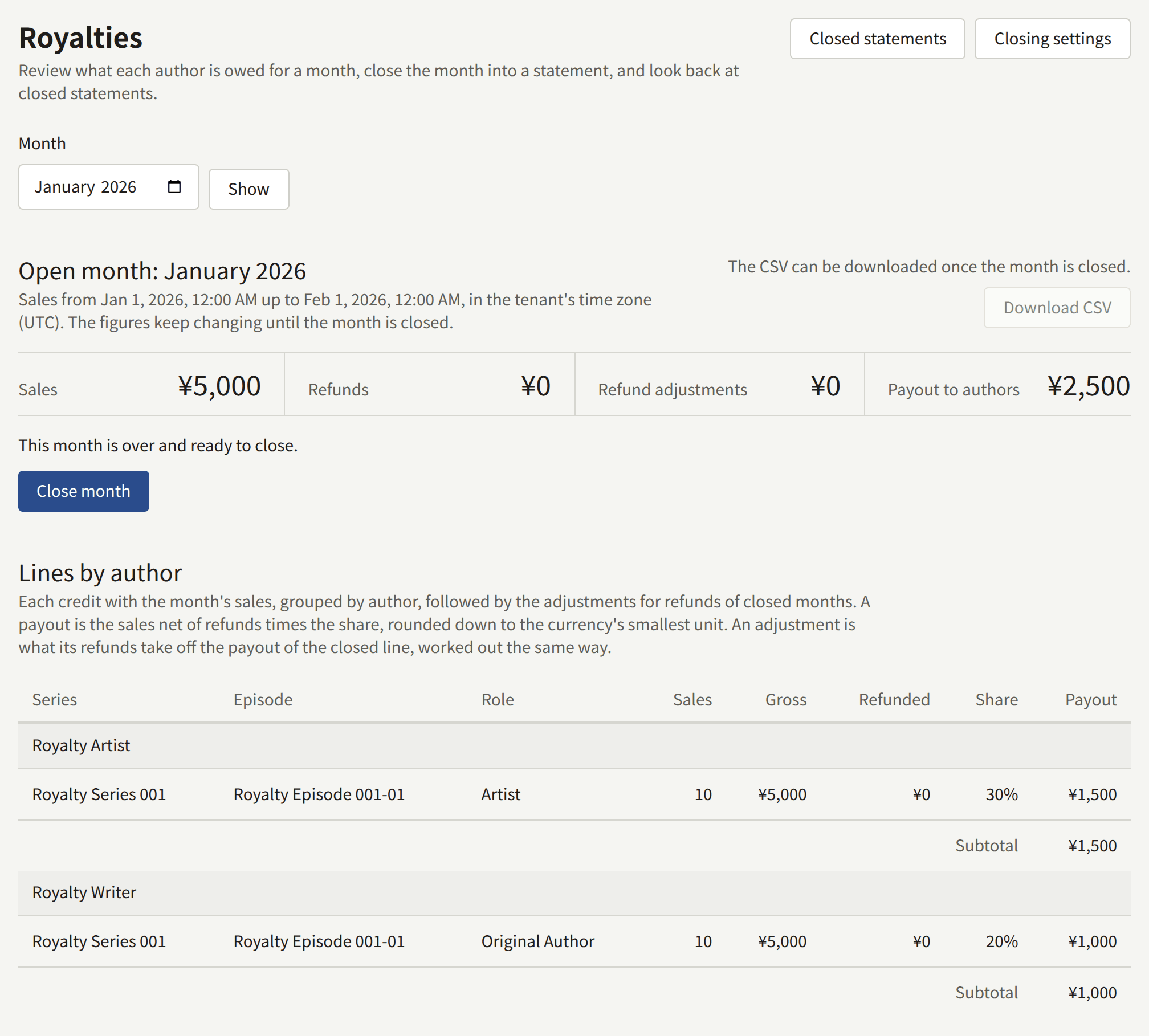
Open month gives four totals:
| Total | What it is |
|---|---|
| Sales | Every sale of the month, at its price, including sales of episodes that credit no Author |
| Refunds | The refunds on those sales |
| Refund adjustments | What the month takes back of the sales of closed months refunded since their close, as A refund after the close describes, each sale counted once: zero, or a negative amount |
| Payout to authors | What the month owes its Authors, the sum of the lines below, adjustments included. The rest of Sales after Refunds and Refund adjustments is the publisher's |
Lines by author groups the month by Author, with a line for each credit on an episode that sold in the month and a Subtotal for the Author. Each line gives the Series, the Episode, the credit's Role, the number of Sales, the Gross amount, the amount Refunded, the Share, and the Payout. An Author credited twice on the same episode, in two roles, has a line for each. An adjustment comes after the month's own lines in its Author's group, says Refund adjustment for the closed month under its episode, and counts in the Author's Subtotal.
Above the totals the screen says where the month stands:
- This month is still in progress. It can be closed once its last day is over in the tenant's time zone.
- This month is over and ready to close. Close month closes it.
- This month closes automatically on a date. The month is closed by
publira workeron that date, and the console offers no way to close it by hand.
Before you close a month
Closing a month fixes it as it stands at that moment, and nothing that happens afterwards reaches it. Check, before closing:
- The credits and shares. The statement takes each share as it stands when the month is closed, not as it stood when the episode sold. Change a share before the close and the whole month is paid at the new share; change it after, and only the open months are.
- The refunds you expect. A refund recorded after the close is taken off the next statement rather than the closed month, as A refund after the close describes, so the Author is paid for the sale first and the payout comes back out of a later month. Wait for a refund you know is coming to have it counted in its own month.
- That the month is over. A sale made late on its last day counts in the tenant's time zone, which may not be yours.
Close the months in order. The console offers the month after the newest statement for this reason, and a month passed over has to be picked with Month to be closed later.
Closing a month
- Open Reports › Royalties. The month shown is the one to close next.
- Check that it says This month is over and ready to close, and read through Lines by author.
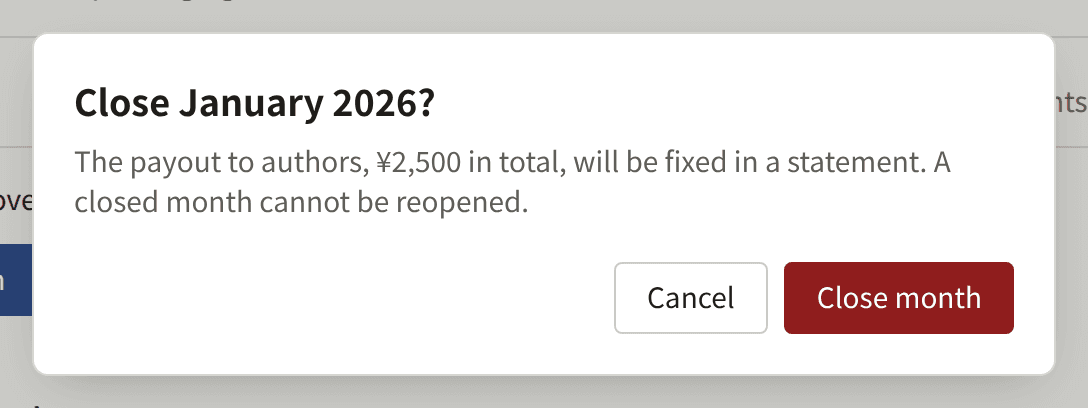
- Choose Close month. The dialog states the Payout to authors that will be fixed. Choose Close month again to confirm.
The console then opens the month's Statement, which shows Closed on, who closed it, and the same totals and lines as the open month had. The close is recorded in Audit logs as Royalty month closed.
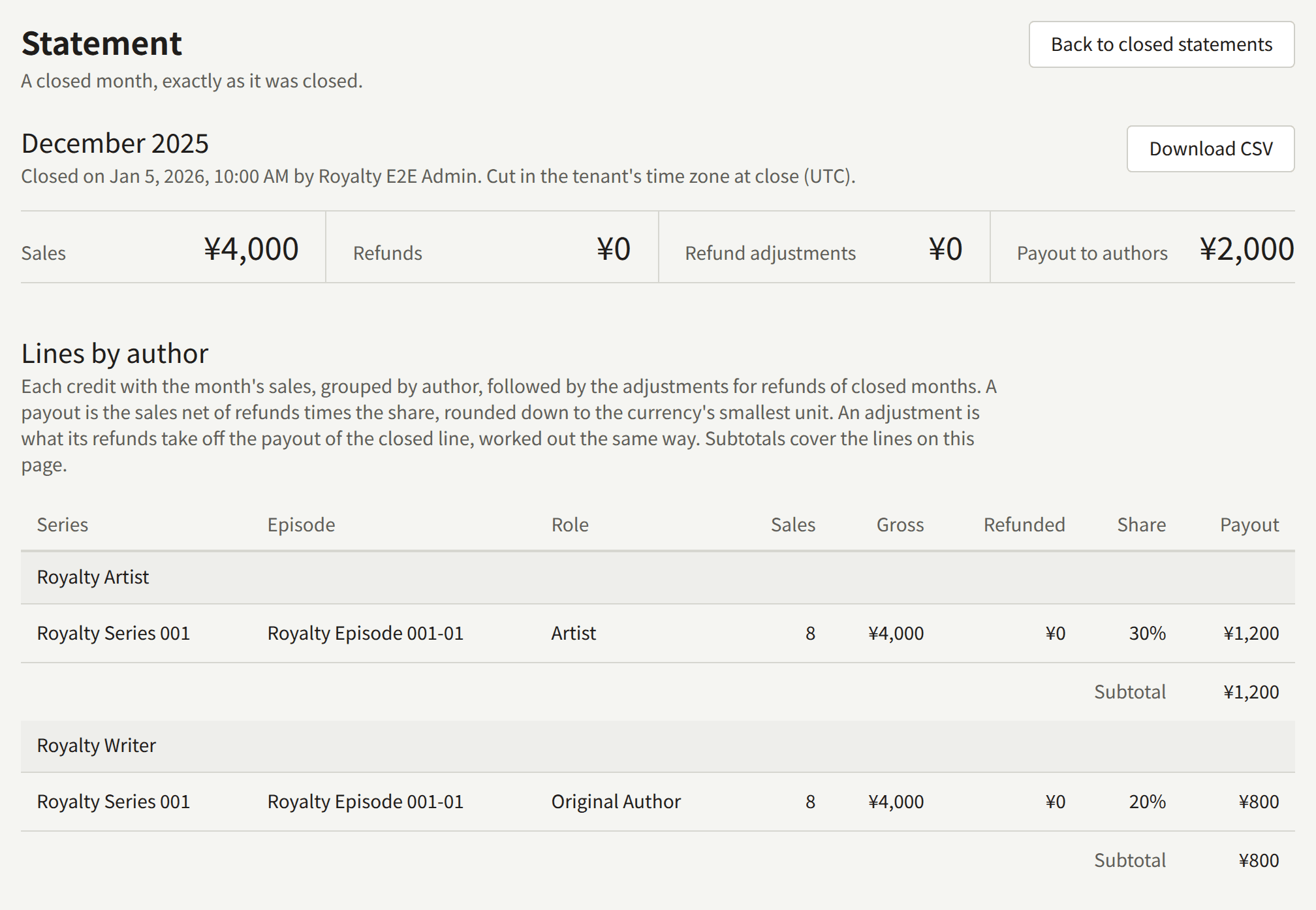
Once closed, a statement keeps each Author's, series', episode's, and role's name as it was at the close: renaming an Author, editing a share, refunding a purchase, or deleting a credit afterwards leaves it as it is. A refund recorded afterwards is taken off the next statement instead. A closed month cannot be reopened, by staff or by the operator. A mistake found afterwards is corrected outside Publira, in what the tenant pays.
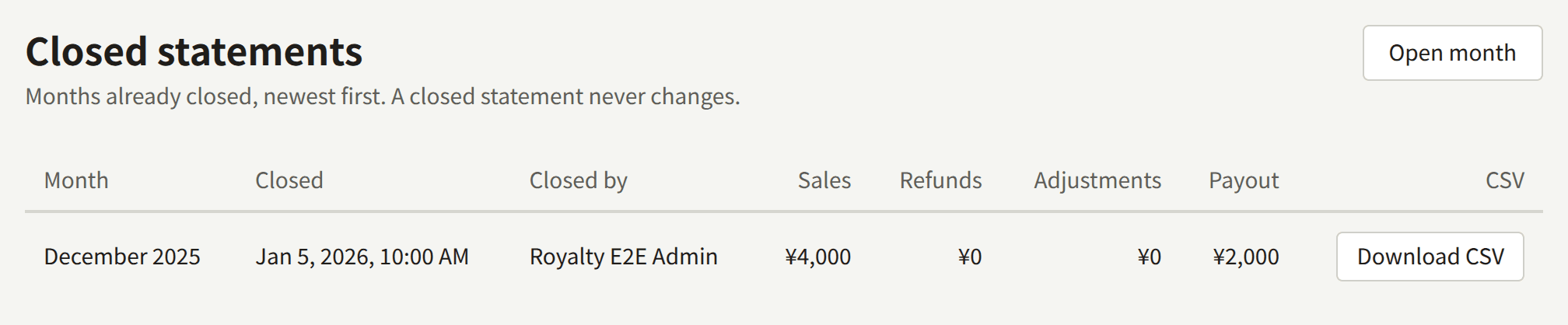
Closed statements lists every closed month, newest first, with when it was closed, who closed it, and its totals. A month closed automatically shows — under Closed by.
Exporting a statement as CSV
Download CSV downloads a closed statement: on the Statement itself, or on its row in Closed statements. An open month cannot be downloaded, since its figures are still changing.
The file is named royalties-<tenant>-<YYYY-MM>.csv. It is UTF-8, with a byte order mark so that Excel reads it correctly, one row for each line of the statement under a header row, and no total row. Its columns are:
| Column | Holds |
|---|---|
period | The month, YYYY-MM |
creator_id, creator_name | The Author |
role_id, role_name | The credit's role, empty for a credit without one |
series_id, series_title | The series |
episode_id, episode_title | The episode |
sale_count | The number of sales |
gross_amount | The sales, in the smallest unit of the statement's currency: yen for JPY, cents for USD |
refunded_amount | The refunds on them, in the same unit |
share_percent | The share, with two decimals, such as 12.50 |
payout_amount | The payout, in the same unit |
currency | The statement's currency, such as USD: the tenant's when the month was closed, and the only one whose sales it counts |
adjusted_period | Empty for a line of the month's own sales. On an adjustment, the closed month it takes a refund back from, YYYY-MM, and its amounts are the negative changes A refund after the close describes |
Names are as they were at the close, and the IDs keep a line tied to its Author and episode across renames. A cell that a spreadsheet would read as a formula is written so that it stays text. A statement downloads the same file every time, and each download is recorded in Audit logs as Royalty statement CSV downloaded.
Closing months automatically
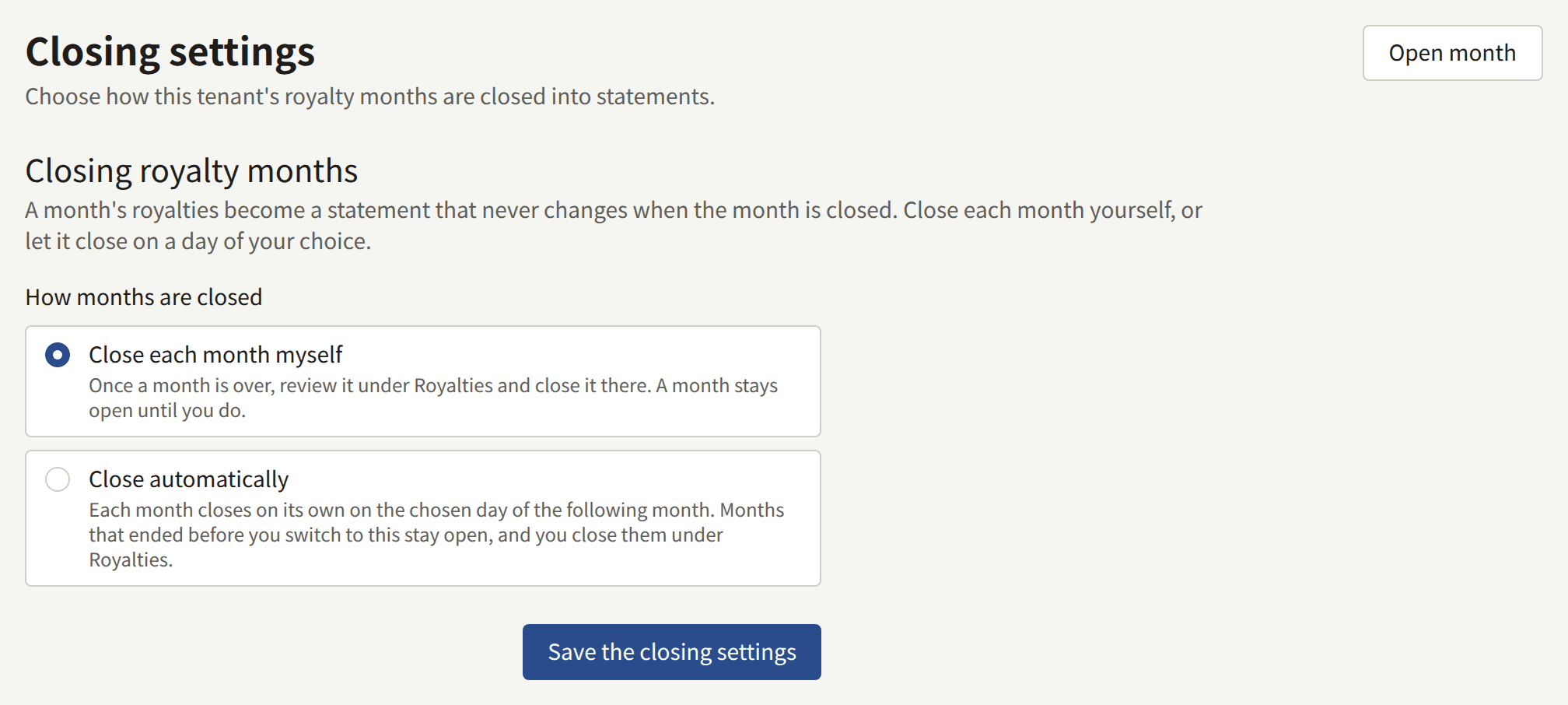
Closing settings, on Royalties, chooses how months are closed:
- Close each month myself, the default: a month stays open until a Tenant admin closes it as above.
- Close automatically: each month is closed on the Close day of the following month, a day from 1 to 28 in the tenant's time zone.
Choose Save the closing settings to apply the choice; the change is recorded in Audit logs as Royalty closing settings updated.
An automatic close happens on the first hourly pass of publira worker after midnight on the close day, closes the month exactly as Close month would, and records no one under Closed by. If the worker was stopped on the close day, it closes the months it owes when it starts again, oldest first. Without publira worker running, no month is closed automatically.
Close automatically applies to the months that end after it is chosen. A month already over when you switch stays a manual close: close it from Royalties as above. Choose a Close day that leaves time for the checks in Before you close a month, since no one is asked before the close, and fix a share before that day rather than after.